Non-Technical Areas
1. Website Content
Having well-written, grammatically correct website content has the biggest influence on SEO and hence your ranking on search engines. The technical aspects of SEO have been taken care of by us (see below) so you may maximise the effects of SEO by adding and updating content on your website. The sections below will guide you on the best ways to do this.
a. Determine keywords or keyphrases (keyword tool)
The first thing to do to maximise the potential SEO presents for your business is to determine what keywords your target audience uses when searching for a business like yours. Eg. self storage, self storage melbourne, storage rental.
It is best to identify and use no more than 3 or 4 primary keywords for your website in general. You may select specific product and service keywords for pages that relate to the content in those pages too.
To help you identify those keywords or keyphrases including the level of competition and popularity you may use the Google Keywords Tool.
For location based searches it is worthwhile including specific locations (eg. self storage south melbourne).
b. Writing good content
Search engines, such as Google, index and assess the relevance of the content on your website. Search engine rank and display pages in search results based on the relevance to the search terms that a user enters. If your page isn't the most relevant for what the user is searching for, then it will be difficult to rank highly for that keyword or phrase. So you should write descriptive articles for your website and use the specific keywords or keyphrases you have selected within that content. You may repeat the keywords in the page as required however the unnecessary over use of the keywords must be avoided as this will compromise how search engines rank your website content. The content should be written in a manner that a person can read easily. You do not need to do anything 'special' (bold, italics, colour etc.) to get the attention of the search engines. If your website has many services or products listed it is worth investing the time to write an in-depth description for each of them.
To edit or add articles on your website please:
- Login to your Administration website
- Go to Content > Edit Content (or Add New Content)
- Save or Finish after you have finished updating your content
c. Frequency / Updates
Keeping your site content updated and adding content regularly generally results in the search engines visiting your website more often in order to index the changes you have made. It is a good idea to develop a strategy and schedule for updating your site content and and then sticking to it, eg. Daily, Weekly or Monthly.
Note: Pages that have been assigned to restricted areas of your website do not get indexed by search engines. You will need to concentrate your efforts on pages that are publicly accessible only.
2. SEO section in your administration Site
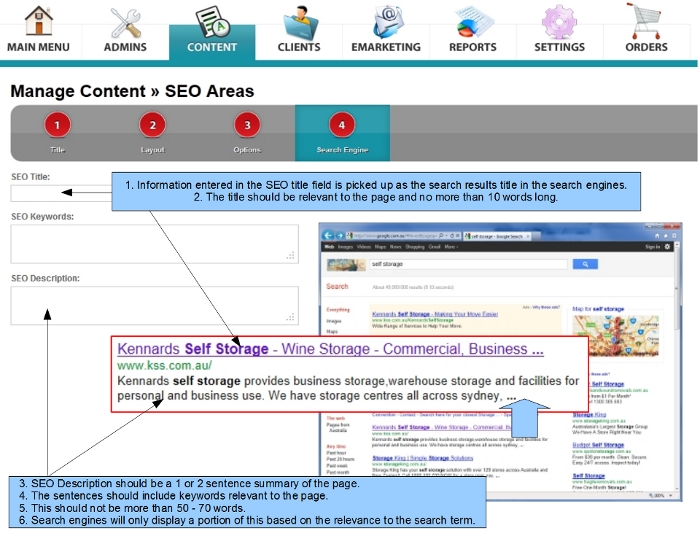
The last tab in any content editing area is called "Search Engine". The fields in this area get automatically converted to relevant technical search engine tags. These allow you to instruct search engines what to display when your website is listed in the search results. These fields may also help improve the rankings and visibility of the page in the search engines. See example below.
Click on image to view a larger version
To access the Search Engine tab you will need to edit an existing content piece and click on the tab labelled "Search Engine" in the grey bar. The fields below are the ones that you can complete
a. SEO Title
This is generally the title of your page. This section allows you to add more to your title such as your business name, location and other keywords relevant to the page. Please attempt to keep this to less than 10 words and avoid keywords that do not get used in the content of the page.
b. SEO Keywords
This option allows you to add a list of keywords (separated by commas) relevant to the page. This is a legacy option and search engines like Google no longer use it. However, some other search engines may read this information and index the page accordingly.
c. SEO Description
This is generally a summary of the page in 1 or 2 sentences with keywords relevant to the main content of the page. This should not be more than 50 to 70 words. Search engines only display a portion of this content based on the relevance to the search term. This description should be useful to your target audience, as they will only click through to your site if the information makes sense to them.
3. Links
Search engines can generally index pages on your website from the navigation menu. However, there are benefits in creating links on your website to link to other pages on your site. This allows search engines to follow pages created deep within the navigation structure of your website. If a page references keywords or keyphrases of another page, then it helps to link the keywords on the first page to go to the other page(s). Pages that are hidden from your website navigation menu, but are linked from other articles, will also get indexed by search engines. If you are not familar with creating links in your website please speak to your Account Manager who will be happy to assist you.
Having links to your website from other external websites that are credible can also help with SEO. Search engines frown upon "link farms" and other deceptive ways of obtaining links to your website that many SEO consultants still recommend and as such using link farms will usually compromise your search engine ranking. Links from reputed sources such as government websites, education providers and other credible businesses will help boost your rankings.
4. Images (ALT tags)
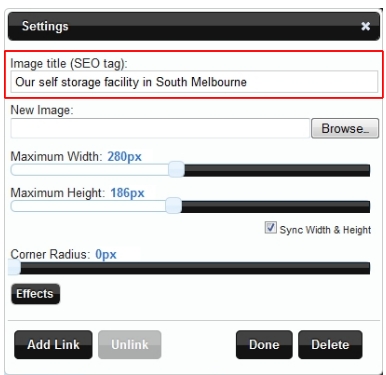
Search engines cannot see images. When a search engine visits a website it can determine that an image exists but cannot determine what the image shows.
Alternate text (ALT tag) is a way of providing a description of the image. By specifying alternate text for an image you can ensure that search engines index your page in a way that achieves a higher ranking.
Your website allows you to specify the alternate text for all images within the content area. See the screenshot to the right showing the location you need to put the alternate text into when editing an image.
A short description (ranging from a few words to a short sentence) is generally enough for this section. Like the page title, the alternate text for the image can also include keywords or keyphrases relevant to the page.
Technical Areas
Your website content management system has been created in such a way to remove the need for your involvement with the technical aspects of SEO and therefore make it easier for you to manage the SEO aspects of your website.
The technical configuration of your website as it applies to SEO has been taken into consideration by default. This means that:
- Your website is accessible by Google and other search engines.
- The technical code and the content created by you is easily readable by the search engines.
- Search engines are able to follow any links you have created on your website.
- Meta Tags are automatically generated as you create your content ("Search Engine" tab).
If there are specific areas you are concerned about, please email your Account Manager who will work with the technical team to ensure that your concerns are addressed properly.



